
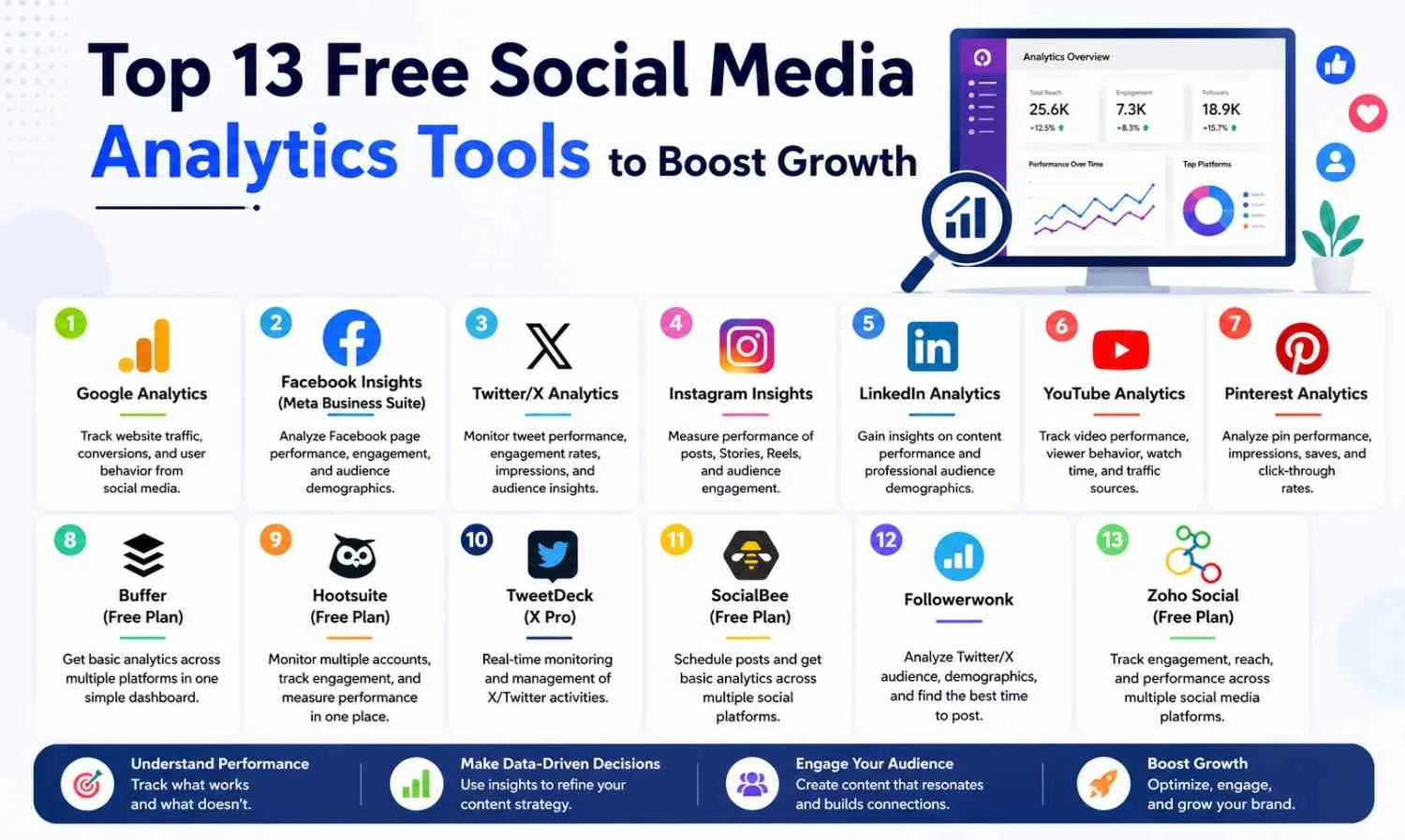
To grow social media, it is not just enough to build a presence on digital platforms—even your competitors know this. To gain an advantage, you should track and monitor performance for development. Fortunately, this will not make a huge dent in your budget because multiple tools are offered for free.
Here, you can see 13 free social media analytics tools, highlighting their functionalities and the audience they are tailored for, along with strategies on how to grow your business smartly.
Defining Social Media Analytics
Simply put, the term social media analytics signifies an activity in the marketing field that involves analyzing data that is both interpretative and descriptive.
Not all tools are the same; they may be free and budget-friendly
Not all tools are budget-friendly or offer the same functionality. Before you add one to your list, you should keep the following in mind: coverage across social platforms, core metrics, ease of use, reporting methods, and data accuracy.
1. Google Analytics
Analyze which social media platforms lead to traffic to your web pages, customer actions, and which deals are closed. Add UTM parameters to social media posts to gain full advantages of Google Analytics.
Disadvantage: Google Analytics doesn’t show social media interaction metrics. They complement each other.
2. Facebook Insights (Meta Business Suite)
Best for: Analyzing Facebook page and post activities
This tool combines reach, engagement, page views, and follower demographics. Use the Posts tab to see what content formats work best.
Disadvantage: Exclusive Facebook. The Meta Business Suite allows direct Instagram access.
3. Twitter/X Analytics
Best for: Real-time content activity on X
View a monthly summary of post clicks, engagement rates, and impressions. Spot posts that gain traction quickly.
Disadvantage: Exclusive to X.
4. Instagram Insights
Best for: Evaluating and optimizing feed posts, Stories, and Reels activities
Disadvantage: Only available for Instagram accounts.
5. LinkedIn Analytics
Best for: B2B social media goals to engage prospective customers
Analyze your content and see audience job roles, industries, and more.
Disadvantage: Exclusive LinkedIn posts.
6. YouTube Analytics
Best for: Video performance and viewer behavior
Runs reports on views and watch statistics, including retention and traffic sources. The Audience Retention report shows the exact moment when viewers stop watching a video. This report can help you design better videos in the future.
Limitation: YouTube only.
7. Pinterest Analytics
Best for: Visual brands, particularly in fashion, food, home decor, and lifestyle
Tracks impressions, saves, and click-through rates on pins. Pinterest is a search and discovery platform, so pin descriptions should follow best practice SEO.
Limitation: Primarily for visual, business-to-consumer brands.
8. Buffer (Free Plan)
Best for: Multi-platform analytics for beginners
Bring together dashboards from four major social platforms (Facebook, Instagram, LinkedIn, and X) to show basic performance data. This is often considered the most entry-level platform available.
Limitation: The free plan is limited in analytics history and the number of messages that can be scheduled. Buffer
9. Hootsuite (Free Plan)
Best for: Managing and monitoring multiple accounts in one place
Tracks competitors’ engagement, follower growth, brand mentions, and more across many profiles. Streams allow you to monitor competitors and desired hashtags in real time.
Limitation: The free plan allows a maximum of two accounts. Hootsuite
10. TweetDeck (X Pro)
Best for: Real-time X/Twitter monitoring and management
X’s multi-column dashboard allows you to manage scheduled tweets, mentions, hashtags, and more, all in one place.
Limitation: X/Twitter only. TweetDeck
11. SocialBee (Free Plan)
Best for: Basic cross-platform scheduling with light analytics
Social Bee’s starter-level analytics provides basic post-performance metrics across Facebook, Instagram, LinkedIn, X, and Pinterest. It acts more as a scheduling tool than a comprehensive analytical solution on the free tier.
Limitation: Analytics depth is significantly restricted on the free plan. SocialBee
12. Followerwonk
Best for: Twitter/X audience analysis
Followerwonk extends native X Analytics with additional information on follower demographics, social authority scores and suggests the best time to post based on high follower activity.
Limitation: Twitter/X only. Followerwonk
13. Zoho Social (Free Plan)
Best for: Basic multi-platform analytics for small businesses
Zoho Social tracks engagement, follower growth, and post reach across all major social media platforms. It integrates well with other Zoho products and is a smart pick for businesses already in the Zoho ecosystem.
Limitation: The free plan limits social profiles and reporting. Zoho Social
How to Choose the Right Tool
Match the tool to your goals:
Goal — Recommended Tools
Track website conversions from social — Google Analytics
Manage multiple platforms in one place — Buffer or Hootsuite
Deep B2B audience insights — LinkedIn Analytics
Video performance tracking — YouTube Analytics
Real-time X monitoring — TweetDeck + Followerwonk
Common Mistakes to Avoid
Chasing vanity metrics — Follower counts and impressions don’t pay bills. Focus on clicks, leads, and conversions.
Ignoring platform benchmarks — Always compare against specific platforms. A 1% engagement rate is strong on LinkedIn but weak on Instagram. Always compare platform-specific benchmarks.
Not acting on data — Unused insights are a waste. You should be able to make at least one solid decision by the end of every review.
Using only one tool — Free tools are limited. Use a platform-native tool along with a multi-platform tool to get a full picture.
What are the Credential Types for the DMV?
What is the best free tool for analytics beginners?
Buffer and Google Analytics are top picks. While Buffer provides an overview of all platforms, Google Analytics connects social activity with actual results on a website.
Can free tools substitute paid social media analytics tools?
For small companies, yes. Free tools cover the most essential features. As your company grows, paid tools offer better data, automation, and deeper analytics.
Which free options are available for social media automation?
Buffer and Hootsuite offer a single dashboard for multi-platform control across Facebook, Instagram, LinkedIn, and X. Combining multi-platform tools with platform-specific tools improves analytics.
How frequently should I review social analytics?
Most companies should review their data weekly. A more in-depth monthly review helps refine strategy and plan contingencies.
What metrics should small businesses focus on?
Focus on engagement rate, reach, follower growth, and the number of users who visit your website or convert into paying customers. These metrics provide the most relevant insights.
Conclusion
Everyone can access social media, even on a limited budget, thanks to free analytics tools. Select tools based on your priority platforms, develop a regular review of practice, and always tie insights to concrete business objectives.
Do you want to take a step further? Our professional social media marketing services can help you achieve measurable growth through data.
ABOUT THE AUTHOR
Content written by Saurabh Sharma
Saurabh is part of the expert content marketing team at ZoomIntoWeb. He has expertise in curating meaningful information that can be used by visitors in general. Saurabh is also involved in creating client-specific stories and blogs.
